Measurement Scales in SPSS

                                      MMeasurement Scales in SPSS


1.Nominal:
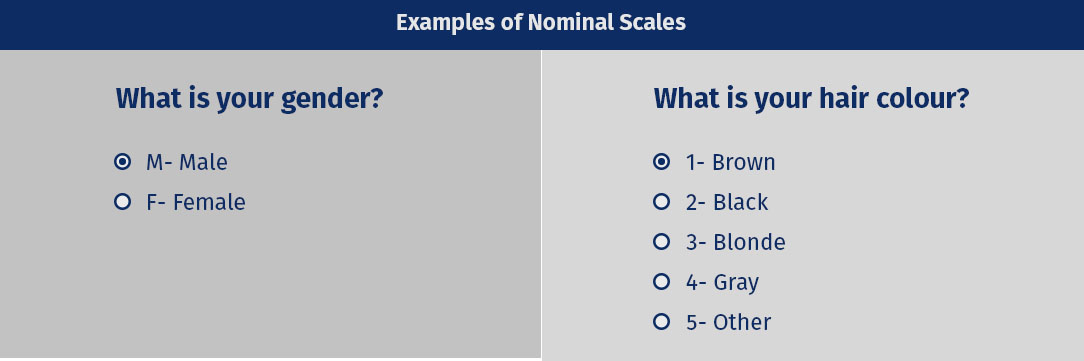
It is measurement scale in which numbers are used as "tags"or "labels" which is used to classify an object.It deals with non-numeric variables.It is used for the purpose of classification. for example, in case of gender scale,it can be classified as Male=1 and Female=2. It is used for only for counting purposes.

nominal scale example

2.Ordinal:
It is the second level of measurement in which ranking of data without actually establishing the degree of variation between them.


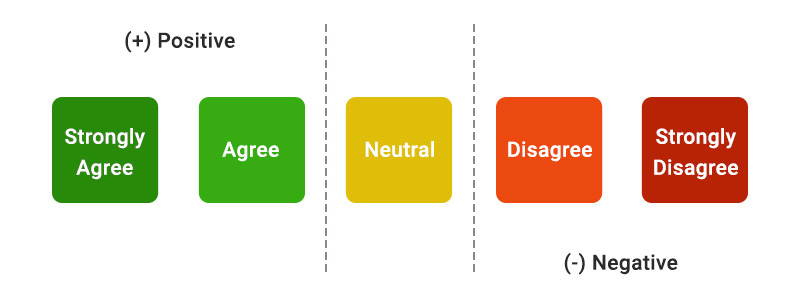
  • Likert Scale through which we can measure the order.

Liker Scale Example
Scale:
Divided into two parts:
1. Interval Scale
2. Ratio Scale

1.Interval Scale:
In this measurement variables are measured in exact manner not in relative manner.

Example:

  • Likert Scale
  • Net Promoter Score(NPS)
  • Bipolar Matrix Table
2.Ratio Scale
It allows researchers to compare the differences or intervals. The ratio scale has a unique feature. It possesses the character of the origin or zero points.

Example:

An example of a ratio scale is:

What is your weight in Kgs?

  • Less than 55 kgs
  • 55 – 75 kgs
  • 76 – 85 kgs
  • 86 – 95 kgs


Comments

Popular posts from this blog

SPSS: Beginners Tutorials

                              SPSS – What Is It S PSS  means “ S tatistical  P ackage for the  S ocial  S ciences” and was first launched in 1968. Since SPSS was acquired by IBM in 2009, it's officially known as IBM SPSS.Generally it is used to analyze various types of data of sectors and most researcher uses this tool as it is open source anybody can use it for analysis purpose. How to Read data in SPSS It can be read through various sources: 1. Statistical file of SPSS. 2. Excel/CSV 3. Database Application 4. Text file 1.Reading Statistical file of SPSS. Statistical files are saved with the .sav extension. following are the steps. Open the “ Menu ” and go to “ File ” option. Select “ Open ”. Click on “ Data ”. Search for the file sample.sav and open it. The Data Editor displays the data in the file. 2. Reading data from   Excel/CSV 1. Open the "Menu"  and go to ...

About ME

HEY! Everyone I am Rajat a passionate researcher love to analyze data statistics and interpret various research done previously. I created this blog in order to help the research enthusiast who want to learn statistics. You will learning the statistics from basic and step-by-step through analysis.  My Approach to Teaching Statistics I want to help you to learn statistics.But I am not telling, you to learn equation Don't get me wrong.Equations are necessary. I want you to learn true essence of statistics. I will help you to learn more about the graphs.However, I'' will focus on teaching in sequential manner.After all you will use statistical tool rather you don't have to remember the formulas. Why You Need to Understand Statistics The world is shifting more towards data-driven place,to draw come with insightful conclusion to a problem statement. Even if you are not performing statistical analysis how will trust the result of others true? This only happen when you know th...